


ARIA API III: Practical C# Patterns for Clinical Development
Introduction
Over the past two articles, we introduced the foundation necessary to begin developing applications with the ARIA API. While understanding the underlying architecture is essential, eventually every developer reaches the point where they simply need to start writing code. Through practical examples and useful code snippets, this blog post provides an overview of the workflow for utilizing the ARIA API to extract data and build improved clinical workflows. The final version of the code is available on GitHub in the ARIA API Snippets repository for readers who would like to follow along.

In the first article, ARIA API I: HL7, FHIR, and the ARIA API, we introduced the modern interoperability standards that underpin today's healthcare systems. We explored the evolution from traditional HL7 messaging toward FHIR resources and REST-based communication, discussed the architecture of the ARIA API, and walked through the process of configuring an API client and validating connectivity using the ARIA API Tester.
The second article, ARIA API II: ARIA API Resources, shifted the focus from configuration to exploration. We learned how to navigate the ARIA API Specifications, interpret FHIR profiles, discover available operations and search parameters, utilize ValueSets and Code Systems, and leverage the ARIA API Tester to understand how resources relate to one another before writing production code.
Using C# allows ARIA API requests, ESAPI operations, and shared application models to coexist within the same project. Nevertheless, developers who are more comfortable with another language can still access the same ARIA API resources and perform the same operations.
With those foundations in place, we're ready to begin building applications.
Rather than focusing on a single clinical workflow, this article presents a collection of reusable C# techniques that appear in nearly every ARIA API project. We'll cover practical programming patterns including authentication, configuring HttpClient, executing GET and POST requests, handling paginated Bundle responses, parsing JSON into strongly typed objects, managing errors, and organizing reusable helper methods. Along the way, we'll also demonstrate a few practical examples that illustrate how these building blocks can quickly become useful clinical tools.
A Note about Programming Languages
The examples throughout this article are written in C#. However, the ARIA API does not require developers to use C# or any other specific programming language. The API communicates through standard HTTP requests and returns data using common formats such as JSON, allowing it to be accessed from Python, JavaScript, Java, PowerShell, and many other languages.
Our long-term goal is to integrate ARIA API functionality with applications built using the Eclipse Scripting API. Because ESAPI applications are developed using .NET, C# is often the most practical choice for this type of integration. Using C# allows ARIA API requests, ESAPI operations, and shared application models to coexist within the same project. Nevertheless, developers who are more comfortable with another language can still access the same ARIA API resources and perform the same operations.
The following examples demonstrate this language-independent design by performing the same simple patient search using both C# and Python.
The request below searches the Patient resource for a patient whose name matches RapidPlan-01:
https://master-ae:55370/fhir/r4/Patient?identifier=RapidPlan-01&_pretty=trueThe first question mark begins the query string. Additional query parameters, such as _pretty=true, are appended using an ampersand.
Both examples assume that a valid VAIS access token has already been generated. The token is supplied in the HTTP Authorization header using the bearer authentication scheme.
C# GET Request:
using HttpResponseMessage response = await client.GetAsync(requestUrl); string responseContent = await response.Content.ReadAsStringAsync();Python GET Request:
import requests
...
 response = requests.get( request_url, headers=headers, timeout=30)
if response.ok:
	print(response.text)
Building the Application Basics
Testing the code snippets provided below is easily performed within a console application. Within Visual Studio, let's generate a new project using the Console Application template. In the following example, I generate a Console App (.NET Framework), but the standard Console App would work as well.
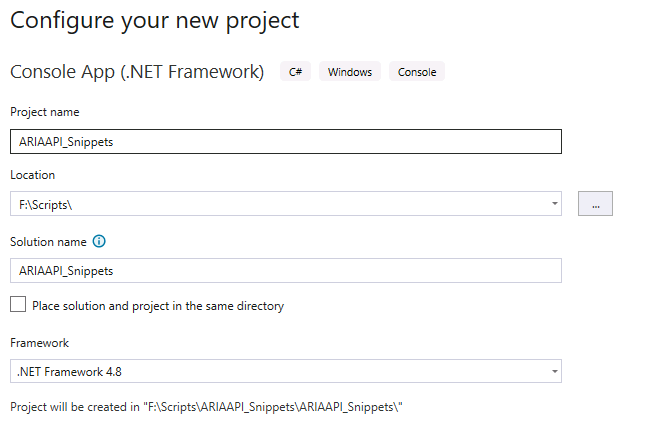
The first steps of the application will be to define the client credentials needed to request a bearer token. Before adding code, make sure to add a JSON serialization API to the project. This project uses Newtonsoft.Json.Linq from Nuget and has the following using directive at the top of the code.
using System.Text.Json.Linq;
The baseUrl will be utilized for each request made through the ARIA API. The rest of these details will be used to generate the bearer token for the application.
// ============================================================
// STEP 1: Configuration
// ============================================================
// These are YOUR connection settings from your PowerShell scripts.
// ⚠️ Replace YOUR_SECRET_HERE with your actual client secret!
string tokenUrl = "https://master-ae.vic.com:44333/tokenservice/connect/token";
string baseUrl = "https://master-ae:55370/fhir/r4";
string clientId = "1d36584e-1ea2-45c4-bede-ea690fcaeafa";
string clientSecret = "GatewayScripts_Varian!2026";
string scopes = "system/ActivityDefinition.rs system/AllergyIntolerance.cruds system/AllergyIntolerance.rs system/Appointment.cruds system/Appointment.rs system/AuditEvent.c system/AuditEvent.cruds system/BodyStructure.rs system/CarePlan.rs system/CareTeam.cruds system/CareTeam.rs system/ChargeItem.cruds system/ChargeItem.rs system/Condition.cruds system/Condition.rs system/Device.rs system/DocumentReference.cruds system/DocumentReference.rs system/Group.rs system/HealthcareService.rs system/Location.rs system/Observation.rs system/Organization.rs system/Patient.cruds system/Patient.rs system/Practitioner.cruds system/Practitioner.rs system/Procedure.rs system/ServiceRequest.rs system/Task.cruds system/Task.rs system/ValueSet.rs user/ActivityDefinition.rs user/AllergyIntolerance.cruds user/AllergyIntolerance.rs user/Appointment.cruds user/Appointment.rs user/AuditEvent.c user/AuditEvent.cruds user/BodyStructure.rs user/CarePlan.rs user/CareTeam.cruds user/CareTeam.rs user/ChargeItem.cruds user/ChargeItem.rs user/Condition.cruds user/Condition.rs user/Device.rs user/DocumentReference.cruds user/DocumentReference.rs user/Group.rs user/HealthcareService.rs user/Location.rs user/Observation.rs user/Organization.rs user/Patient.cruds user/Patient.rs user/Practitioner.cruds user/Practitioner.rs user/Procedure.rs user/ServiceRequest.rs user/Task.cruds user/Task.rs user/ValueSet.rs";
Generating the Bearer Token.
The first step through the application is generating the bearer token for Authentication into the API. The token request could happen once or many times depending on how your application is structured.
Single bearer token request: An application that runs on demand and collects all information required and outputs to the user. Most workflows like this require only one bearer token request.
Multiple bearer token requests: If the application allows for users to make requests on demand (for example, in a user interface), the bearer token may need to be requested multiple times as the bearer token will expire eventually. I only mention this as the following code may have need to be wrapped in a method that can be called for each subsequent API request if there's a chance the bearer token would expire between requests.
Below is the code to generate the bearer token. It involves first setting up an HttpClientHandler, and define the required authentication information for the bearer token request. OAuth client credentials are provided in the following format:
Parameter | Purpose | Example |
grant_type | Specifies which OAuth 2.0 authentication workflow should be used. The ARIA API uses the Client Credentials grant, meaning the application authenticates itself rather than an individual user logging in. | "client_credentials" |
client_id | The unique identifier assigned to your application when it is created in the VAIS Administration tool. It tells the token service which registered client is requesting access. | "a8f2c3..." |
client_secret | The confidential password associated with the client. The token service validates both the Client ID and Client Secret before issuing a bearer token. This value should be stored securely and never hardcoded into production applications or shared publicly. | MySecureSecret123! |
scope | Specifies the permissions being requested for the access token. The scopes define which ARIA API resources and operations the application is allowed to access. These values originate from the ARIA API key downloaded from MyVarian and are typically supplied as a space-delimited string. | system/Task.rs |
The request for the token is a POST request. As can be seen from the code below the cient variable has a PostAsync method that includes the tokenUrl (resource) and the authentication credentials. From here, the result bundle is then parsed with JObject and the token is acquired. Now the application is ready to use the ARIA API.
// ============================================================
// STEP 2: Get a Bearer Token
// ============================================================
// This does the same thing as your PowerShell Invoke-RestMethod
// to the token URL. We send clientId + secret, get a token back.
var handler = new HttpClientHandler
{
// ARIA uses self-signed certificates in test environments.
// This tells C# to accept them. (Don't do this in production!)
ServerCertificateCustomValidationCallback = (msg, cert, chain, errors) => true
};
using (var client = new HttpClient(handler))
{
var tokenData = new Dictionary<string, string>
{
{ "grant_type", "client_credentials" },
{ "client_id", clientId },
{ "client_secret", clientSecret },
{ "scope", scopes }
};
var tokenResponse = client.PostAsync(tokenUrl, new FormUrlEncodedContent(tokenData));
var tokenBody = tokenResponse.Result.Content.ReadAsStringAsync().Result;
var tokenDoc = JObject.Parse(tokenBody);
string token = tokenDoc["access_token"].ToString();
Console.WriteLine("Token Acquired!");
Console.WriteLine(token);
A Couple of Useful Code Snippets
One of the first challenges developers encounter when working with the ARIA API is that the identifiers used by clinicians are not always the identifiers required by FHIR. A user may know a patient by an MRN, an appointment by its displayed description, or another object by a familiar identifier shown inside ARIA. The API, however, often represents relationships between resources using an internal FHIR resource ID.
For example, a user may enter the patient identifier RapidPlan-01, but another API request may require a reference such as:
Patient/Patient-437The GetFhirId method below provides a reusable bridge between these two representations. It accepts a resource type and one or more familiar search parameters, performs a FHIR search, and returns the internal id of the first matching resource. This allows an application to begin with information already known to the user and translate it into the identifier required for subsequent ARIA API request.
static string GetFhirId(HttpClient client, string baseUrl, string accessToken, string resourceType, Dictionary<string, string> searchParameters)
{
client.DefaultRequestHeaders.Clear();
client.DefaultRequestHeaders.Add("Authorization", "Bearer " + accessToken);
client.DefaultRequestHeaders.Add("Accept", "application/fhir+json");
var queryString = string.Join("&", searchParameters.Select(kvp => $"{kvp.Key}={Uri.EscapeDataString(kvp.Value)}"));
string searchUrl = $"{baseUrl}/{resourceType}?{queryString}";
var response = client.GetAsync(searchUrl).Result;
if (!response.IsSuccessStatusCode)
{
throw new Exception($"FHIR search failed: {response.StatusCode} - {response.ReasonPhrase}");
}
var responseBody = response.Content.ReadAsStringAsync().Result;
var bundle = JObject.Parse(responseBody);
var entries = bundle["entry"];
if (entries == null || !entries.HasValues)
{
return null;
}
var firstResource = entries.First["resource"];
return firstResource["id"]?.ToString();
}
The returned FHIR ID can then be used to search for related resources. For example, the application could retrieve appointments associated with that patient:
Appointment?patient=Patient-437The reverse translation is equally important. FHIR responses frequently contain references to related resources using only their internal IDs. An Appointment resource, for example, may refer to a patient using a value such as Patient/Patient-437. While that reference is meaningful to the API, displaying Patient-437 in a clinical application would not be particularly useful to the user.
The GetUserFacingId method retrieves the referenced resource and returns a more recognizable property, such as its identifier, name, or another requested field. This allows the application to translate the API's internal relationships back into values that make sense to clinicians.
static string GetUserFacingId(HttpClient client, string baseUrl, string accessToken, string resourceType, string fhirId, string fieldName)
{
client.DefaultRequestHeaders.Clear();
client.DefaultRequestHeaders.Add("Authorization", "Bearer " + accessToken);
client.DefaultRequestHeaders.Add("Accept", "application/fhir+json");
string resourceUrl = $"{baseUrl}/{resourceType}/{fhirId}";
var response = client.GetAsync(resourceUrl).Result;
if (!response.IsSuccessStatusCode)
{
throw new Exception($"FHIR resource retrieval failed: {response.StatusCode} - {response.ReasonPhrase}");
}
var responseBody = response.Content.ReadAsStringAsync().Result;
var resource = JObject.Parse(responseBody);
if (fieldName == "identifier")
{
var identifiers = resource["identifier"];
if (identifiers != null && identifiers.HasValues)
{
return identifiers.First["value"]?.ToString();
}
}
else if (fieldName == "name")
{
var name = resource["name"];
if (name != null)
{
if (name.Type == JTokenType.String)
{
return name.ToString();
}
}
}
else
{
var field = resource[fieldName];
if (field != null)
{
return field.ToString();
}
}
return null;
}
Together, these methods support a common ARIA API workflow:

This pattern is especially valuable when moving between related resources. An application might begin with a patient MRN, translate it into a Patient FHIR ID, retrieve the patient's appointments, inspect the participants or locations referenced by those appointments, and then resolve those internal references into names that can be displayed in the user interface.
These methods also make the application easier to maintain. Rather than writing separate lookup logic for every resource type, the same general methods can be reused for Patients, Appointments, Practitioners, Organizations, Locations, and other FHIR resources, provided the appropriate resource type, search parameters, and display field are supplied.
Important Considerations: The examples return the first matching search result. In a production application, developers should consider what should happen when the search returns no results or multiple possible matches. A patient identifier may be unique, but a patient name, appointment description, provider name, or location name may not be. Applications should therefore use the most specific search parameters available and, when appropriate, validate the number of returned resources before selecting one.
Putting it all Together
In the final version of the application, we would like to input a patient, and receive all the Treatment Activities and the Device (treatment machine) used for those appointments. The first step is to obtain the patient FHIR ID. Here we use our new method GetFhirID passing in the "identifier" parameter and our sample patient ID RapidPlan-01. The method works as expected and provides the patient Id.
// ============================================================
// STEP 3: Get Patient FHIR ID
// ============================================================
Console.WriteLine("[Step 2] Looking up Patient FHIR ID...");
string patientIdentifier = "RapidPlan-01";
var patientSearchParams = new Dictionary<string, string>
{
{ "identifier", patientIdentifier }
};
string patientFhirId = GetFhirId(client, baseUrl, token, "Patient", patientSearchParams);
if (patientFhirId == null)
{
Console.WriteLine($"ERROR: Patient with identifier '{patientIdentifier}' not found.");
Console.ReadLine();
return;
}
Console.WriteLine($"Patient FHIR ID: {patientFhirId}");
Console.WriteLine();
Now using this FHIR ID we can search for appointments on the patient. Here the url is targeting the Appointment Resource and inputting both search parameters patient=Patient/<patientFHIRId> and service-type=Treatment.
Inside the while loop in this snippet, there is a check for a nextUrl. This check is imperative if your ARIA API request might return so many responses that they don't all fit on one page. This will be discussed in detail later. For each "entry" in the response some details about the appointment are displayed such as the FHIR ID of the appointment and the start-time. What's important for this example is getting the Device (treatment machine) that the treatment will be performed on.
Appointment bundles have a parameter for participant. The participant can be the patient, physician, location, or device. The goal is to find the participant with the type/display of Device. From this device, we will read the device -- a FHIR ID for the treatment machine-- and use the GetUserFacingId method to return the treatment machine name familiar to the user.
(scroll past the long code snippet to see the final descriptions)
// ============================================================
// STEP 4: Search for Treatment Appointments (with pagination)
// ============================================================
Console.WriteLine("[Step 3] Searching for Treatment appointments...");
client.DefaultRequestHeaders.Clear();
client.DefaultRequestHeaders.Add("Authorization", "Bearer " + token);
client.DefaultRequestHeaders.Add("Accept", "application/fhir+json");
string nextUrl = $"{baseUrl}/Appointment?patient=Patient/{patientFhirId}&service-type=Treatment";
int pageNumber = 1;
int totalAppointments = 0;
Console.WriteLine("========================================");
Console.WriteLine(" Treatment Appointments & Devices");
Console.WriteLine("========================================");
Console.WriteLine();
while (!string.IsNullOrEmpty(nextUrl))
{
var appointmentResponse = client.GetAsync(nextUrl).Result;
if (!appointmentResponse.IsSuccessStatusCode)
{
Console.WriteLine($"ERROR: Failed to retrieve appointments: {appointmentResponse.StatusCode}");
break;
}
var appointmentBody = appointmentResponse.Content.ReadAsStringAsync().Result;
var appointmentBundle = JObject.Parse(appointmentBody);
var entries = appointmentBundle["entry"];
if (entries != null && entries.HasValues)
{
Console.WriteLine($"--- Page {pageNumber} ---");
foreach (var entry in entries)
{
totalAppointments++;
var appointment = entry["resource"];
string appointmentId = appointment["id"]?.ToString();
string appointmentStart = appointment["start"]?.ToString();
Console.WriteLine($"\nAppointment #{totalAppointments}:");
Console.WriteLine($" FHIR ID: {appointmentId}");
Console.WriteLine($" Start Time: {appointmentStart}");
var participants = appointment["participant"];
if (participants != null && participants.HasValues)
{
foreach (var participant in participants)
{
var actor = participant["actor"];
if (actor != null)
{
string reference = actor["reference"]?.ToString();
string display = actor["display"]?.ToString();
if (!string.IsNullOrEmpty(reference) && reference.StartsWith("Device/") && display == "Device")
{
string deviceFhirId = reference.Substring("Device/".Length);
try
{
string deviceName = GetUserFacingId(client, baseUrl, token, "Device", deviceFhirId, "name");
if (!string.IsNullOrEmpty(deviceName))
{
Console.WriteLine($" Machine: {deviceName}");
}
else
{
Console.WriteLine($" Machine: (Device {deviceFhirId} - name not found)");
}
}
catch (Exception ex)
{
Console.WriteLine($" Machine: ERROR retrieving device name - {ex.Message}");
}
}
}
}
}
}
Console.WriteLine();
}
nextUrl = null;
var links = appointmentBundle["link"];
if (links != null)
{
foreach (var link in links)
{
if (link["relation"]?.ToString() == "next")
{
nextUrl = link["url"]?.ToString();
pageNumber++;
break;
}
}
}
}
Console.WriteLine("========================================");
Console.WriteLine($"Total Treatment Appointments Found: {totalAppointments}");
Console.WriteLine("========================================");
Console.WriteLine();
Console.WriteLine("Press any key to exit...");
Console.ReadLine();
After each treatment machine is written, the code will search for a nextUrl. This would mean that there is a link in the API response that includes the next page of response data. if the nextUrl is visible, the while loop checks for additional appointments. The response should look as follows in the Console for patients with multiple appointments:

A Note on Pagination
One important concept developers should understand when working with the ARIA API is that FHIR search operations should never assume that every matching resource is returned in a single response. Instead, search results are typically returned as a Bundle, and when the number of matching resources exceeds the server's configured page size, the Bundle contains only the first page of results.
Additional pages are made available through navigation links contained within the Bundle. If an application ignores these links, it may unknowingly process only a subset of the available data.
For example, consider retrieving all treatment appointments for a patient. A patient with only a few treatment fractions may have every appointment returned in the initial Bundle. However, a patient with a lengthy treatment history, multiple treatment courses, or years of follow-up appointments may require several pages of results. An application that reads only the first Bundle would miss the remaining appointments entirely.
Fortunately, FHIR provides a standardized solution through the Bundle's link element. When another page of results exists, the Bundle includes a link whose relation property is "next". Rather than attempting to calculate page numbers or offsets manually, applications simply follow the URL provided in this link until no additional "next" link exists.
This is a recommended pattern whenever searching FHIR resources. Whether retrieving Patients, Appointments, Procedures, DocumentReferences, Observations, or virtually any other resource type, developers should assume that search results may be paginated and write their applications accordingly. Doing so ensures that applications remain reliable as clinical databases grow over time.
Conclusion
Throughout this three-part series, we have explored the ARIA API from both a conceptual and practical perspective. The series began by introducing the modern interoperability standards that make the API possible, examined the resources and documentation available to developers, and finally demonstrated how these concepts translate into working C# applications through reusable programming patterns.
The examples presented in this article are intentionally simple, but they illustrate many of the techniques that serve as the foundation for larger clinical applications.
Authenticating with VAIS, issuing HTTP requests, translating between user-facing identifiers and FHIR resource IDs, handling paginated Bundle responses, and parsing JSON are patterns that appear repeatedly regardless of whether an application retrieves appointments, uploads clinical documents, monitors workflows, or integrates with external systems.
As you begin developing your own applications, remember that the ARIA API is fundamentally a collection of standardized FHIR resources connected through relationships. Once you become comfortable navigating those relationships and building reusable helper methods, developing new applications often becomes an exercise in understanding the clinical workflow rather than learning new programming techniques. It is exciting to consider the future of interoperability if vendor engineers continue contributing to useful programmatic solutions to workflow automation.
Check out the code in the open source ARIA API Snippets repository on GitHub and try for yourself.


Comments